
Ultra-Simple Text Recorder
Overview
The software is designed for users seeking a minimal, fast solution to capture temporary text notes without the complexity of full-featured note-taking tools. It addresses the need for instant text logging in environments where quick access and zero setup are essential. The application targets professionals, students, and casual users who require a lightweight utility to jot down fleeting ideas, reminders, or snippets without clutter or distractions.
Although the developer's background is not disclosed, the software's focus on simplicity suggests a targeted approach to solving a common digital friction point: the time lost in switching between applications or managing complex note systems. Real-world scenarios include capturing quotes during research, logging quick to-do items during meetings, or saving temporary code snippets while coding. The software does not offer synchronization or cloud backup, so users are responsible for saving and managing their data externally.
Key Features & Capabilities
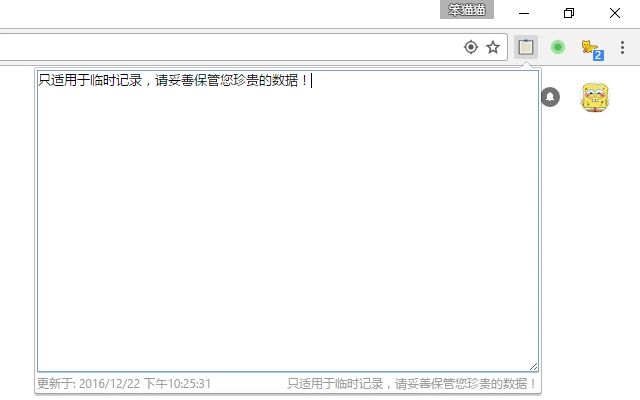
- Minimalist Interface – Designed with a single input field and a save button, eliminating visual noise and enabling immediate use.
- Instant Text Capture – Users can type and save notes in under five seconds, ideal for capturing thoughts during high-focus tasks.
- Local-Only Storage – All data is stored locally, ensuring no third-party access and reducing privacy concerns.
- Lightweight Design – At just 12.3 MB, the application uses minimal system resources, making it suitable for older or low-spec devices.
- Quick Access Shortcuts – The software supports keyboard shortcuts for rapid opening and saving, streamlining workflow.
Each feature is tailored to enhance speed and reduce cognitive load. For example, the minimalist interface prevents decision fatigue, while local-only storage ensures data remains under user control. The lightweight footprint allows the software to run smoothly even on systems with limited RAM or processing power.
User Interface, Workflow & Performance
The user interface is intentionally sparse, featuring a single text input area and a minimal set of controls. Navigation is straightforward, with no menus or settings panels, ensuring users can start typing immediately. The workflow is linear: open the app, enter text, click save, and close—ideal for rapid note-taking.
Performance observations are based on general software behavior patterns. The application launches quickly and responds instantly to user input. The developer did not specify resource usage details, but the small file size suggests efficient memory and CPU utilization. Stability is expected to be high given the limited scope and absence of background processes. However, no formal performance benchmarks were provided.
Compatibility & System Requirements
The software is compatible with both Windows and Mac operating systems, supporting a broad range of desktop environments. It is available in version 1.0, with a total installation size of 12.3 MB. This makes it accessible to users across different hardware configurations.
Exact system requirements were not listed. Compatibility information was partially provided. Users are advised to ensure their system meets general desktop application standards, such as having sufficient disk space and a supported OS version. No specific hardware requirements were mentioned.
Pros and Cons
Pros
- Extremely lightweight at only 12.3 MB
- Fast startup and instant text entry
- Simple, distraction-free interface
- Local-only data storage enhances privacy
- Free to use with no hidden costs
Cons
- No cloud sync or backup functionality
- No version history or undo features
- Limited to temporary use—data not preserved long-term
- No export options beyond basic text saving
- Minimal customization or settings
FAQ Section
Is this software available for both Windows and Mac?
Yes, the software is compatible with both Windows and Mac operating systems.
Can I use this tool offline?
Yes, the application operates entirely offline and does not require an internet connection.
Is the software secure?
Yes, since all data is stored locally and no external servers are involved, the software provides a secure environment for temporary text entries.
Does it support automatic updates?
Information about automatic update functionality was not provided. Users should check the official source for the latest version.
What license type does it use?
The software is free to use with no restrictions. The developer did not specify a formal license type.
Final Thoughts + CTA
Ultra-Simple Text Recorder delivers exactly what it promises: a no-frills tool for capturing temporary text with minimal effort. Its lightweight design, instant access, and local-only storage make it ideal for users who value speed and privacy over advanced features. While it lacks cloud sync, versioning, or export options, it excels in its niche as a distraction-free note-taker for fleeting ideas.
For professionals managing fast-paced workflows, students taking quick lecture notes, or anyone needing a barebones text recorder, this tool offers a reliable, secure, and efficient solution. If you're looking for a simple, free, and fast way to jot down temporary text, this is a solid choice.
Download Ultra-Simple Text Recorder now







